
Buy X Get Y
Overview
The Buy X Get Y function implements a classic promotional pattern: buy a certain quantity of items, and get other items discounted or free. The buy items and the get items can be the same products or entirely different products, which supports a wide range of promotional strategies.
| Property | Value |
|---|---|
| Discount Classes | Product, Shipping |
| Billing | Starter plan and above |
| Condition Support | All 16 conditions. The 9 cart-level conditions decide whether the rule group applies. The 7 product-level conditions limit which lines count as buy items or get items. The shipping discount checks the 9 cart-level conditions and also needs enough matching items for at least one get item. Product-level conditions decide which lines count. |
Buy X Get Y supports the Product and Shipping discount classes. The function counts qualifying “buy” items, calculates how many “get” items earn a discount, and by default gives that discount to the cheapest eligible get items first.
Key Concepts
| Concept | Description |
|---|---|
buyQuantity | The number of items the customer must purchase to form one “set.” |
getQuantity | The number of items that receive a discount per set. |
maxSets | The maximum number of sets the function will apply. Set to 0 for unlimited. |
buyItemFilter | Defines which products count as “buy” items. Uses filter types like all, collection, or productTag. |
getItemFilter | Defines which products are eligible as “get” items. Same filter types as buy. |
| Get item selection order | The Get item selection order setting (itemSelectionOrder) decides which get items receive the discount: Cheapest items first (the default), Most expensive items first, or Cart order. |
| A unit counts once | When a product matches both filters, each unit counts as a buy item or as a get item, never as both. In a “Buy 2 Get 1 Free” offer where all products qualify, a cart of 3 identical items uses 2 as the buy items and 1 (the third) as the get item. |
Free Gift with Purchase
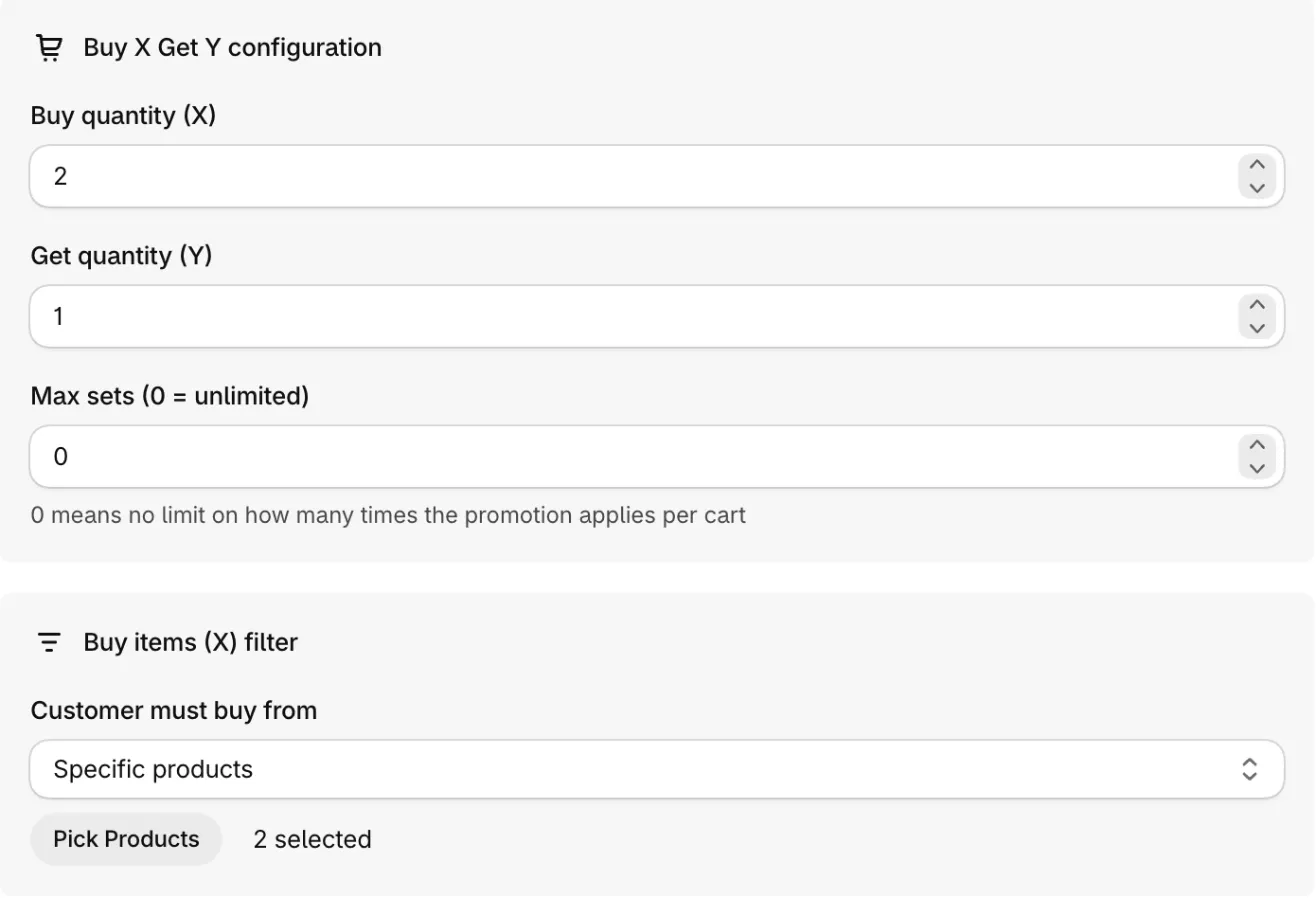
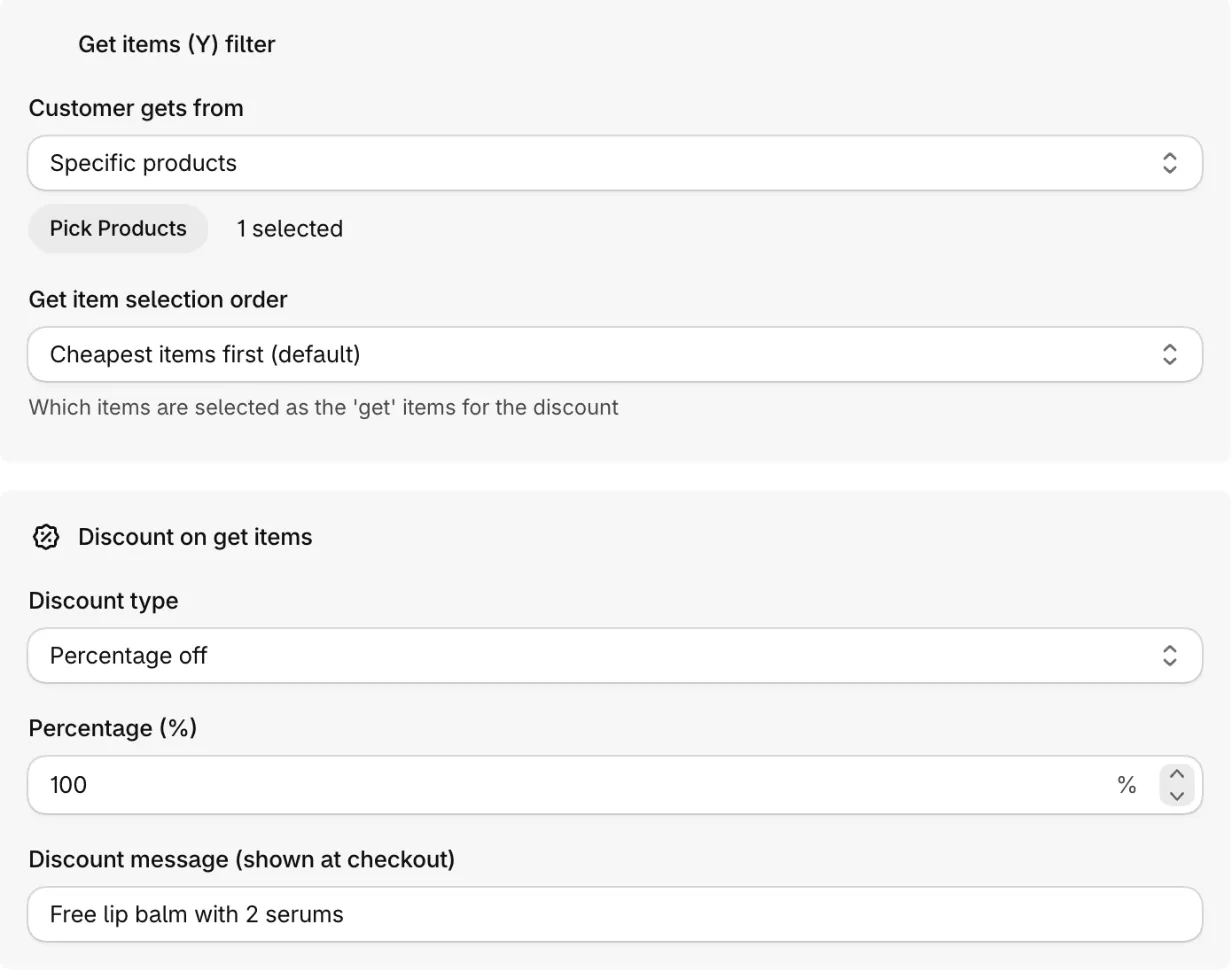
A free gift with purchase is a Buy X Get Y rule group whose get discount is 100% off. For example, the buy filter is a serum collection with a buy quantity of 2, and the get filter is the lip balm product with a get quantity of 1.
Alfo does not add the free item to the cart. The shopper adds the get item to the cart like any other product. When the cart holds enough buy items and the get item, Alfo applies the get discount to the get item at checkout. Without enough buy items, the get item keeps its full price.
So tell shoppers which item to add, for example in the product description of the buy items. To make sure that only the gift gets the discount, set Customer gets from to Specific products or Specific variants and pick the gift.

Real-Life Use Cases
1. Buy 2 Get 1 Free (Same Product)
A BOGO offer on any product. All products in the store qualify, and the cheapest item in the cart is the one discounted.
| Setting | Value |
|---|---|
buyQuantity | 2 |
getQuantity | 1 |
buyItemFilter | all |
getItemFilter | all |
getDiscount | Percentage, 100% |
maxSets | 0 (unlimited) |
A cart with 6 items gets 2 free items (2 sets of “Buy 2 Get 1”).
2. Buy 3 Coffees Get 1 Pastry 50% Off
A cross-category promotion where the buy and get items come from different product groups. This encourages customers to try a new category.
| Setting | Value |
|---|---|
buyQuantity | 3 |
buyItemFilter | Collection “Coffee” |
getQuantity | 1 |
getItemFilter | Product tag “pastry” |
getDiscount | Percentage, 50% |
maxSets | 1 |
3. Buy Laptop Get Case Free
A targeted accessory promotion tied to a high-value purchase. The buy filter targets a specific product or collection, and the get filter targets the accessory.
| Setting | Value |
|---|---|
buyQuantity | 1 |
buyItemFilter | Collection “Laptops” |
getQuantity | 1 |
getItemFilter | Collection “Laptop Cases” |
getDiscount | Percentage, 100% |
maxSets | 1 |
4. Buy 2 Get 1 Free (Max 3 Sets)
Same as use case 1, but capped at 3 sets to limit exposure. A cart with 20 items still gets only 3 free items.
| Setting | Value |
|---|---|
buyQuantity | 2 |
getQuantity | 1 |
maxSets | 3 |
Algorithm
The Buy X Get Y function follows this allocation algorithm. A unit counts once: as a buy item or as a free get item, never as both.
Step 1: Find the Eligible Lines
Gift cards never count. The product-level conditions of the rule group limit which lines count (see Rule Groups & Logic for AND and OR).
Step 2: Split the Units
Each unit of an eligible line falls into one group:
| Group | Units that match |
|---|---|
| Buy only | buyItemFilter and not getItemFilter |
| Get only | getItemFilter and not buyItemFilter |
| Both | both filters |
Step 3: Count the Free Units
s sets need s x buyQuantity buy units. The function takes them from the buy-only units first, then from the units that match both filters. The free units are the get-only units plus the units of both filters that the buy side leaves, up to s x getQuantity, so the last set can be partial:
free_units(s) = min(s * getQuantity, get_only + both_left_after_buy(s))The function uses the number of sets that gives the most free units. When maxSets is above 0, it uses at most maxSets sets.
Step 4: Order the Get Lines
The Get item selection order setting orders the get lines: cheapest first (the default), most expensive first, or cart order.
Step 5: Allocate Discounts
Walk through the ordered get lines. Each line gives up to its quantity until the free units are used up. Lines that match both filters give, together, at most the units of both filters that the buy side left.
Walkthrough Example
Offer: Buy 2 Get 1 Free, all products, unlimited sets.
Cart contents:
| Item | Price | Quantity |
|---|---|---|
| Socks | $5 | 2 |
| T-Shirt | $20 | 3 |
| Jacket | $80 | 1 |
Step 1: All 3 lines are eligible.
Step 2: Every unit matches both filters: 0 buy-only units, 0 get-only units, 6 units of both filters.
Step 3: Count the free units for each number of sets:
| Sets | Buy units | Units left | Free units |
|---|---|---|---|
| 1 | 2 | 4 | min(1, 4) = 1 |
| 2 | 4 | 2 | min(2, 2) = 2 |
| 3 | 6 | 0 | min(3, 0) = 0 |
2 sets give the most free units: 2.
Step 4: Cheapest first: Socks ($5), T-Shirt ($20), Jacket ($80).
Step 5: Socks: 2 units discounted. The 2 free units are used up. Stop.
Result: The 2 Socks receive the 100% discount (free), for $10 off. The 3 T-Shirts and the Jacket are the 4 buy items.
Configuration Example: Buy 2 Get 1 Free
{
  "version": "1.0",
  "strategy": "first",
  "ruleGroups": [
    {
      "id": "rg_001",
      "name": "Buy 2 Get 1 Free",
      "enabled": true,
      "conditionLogic": "and",
      "conditions": [],
      "buyQuantity": 2,
      "getQuantity": 1,
      "maxSets": 0,
      "buyItemFilter": { "filterType": "all" },
      "getItemFilter": { "filterType": "all" },
      "getDiscount": {
        "type": "percentage",
        "value": 100,
        "message": "Buy 2 Get 1 FREE"
      }
    }
  ],
  "rejectionRules": []
}
Key Fields
| Field | Purpose |
|---|---|
buyQuantity | Number of items required to form one buy set. |
getQuantity | Number of items discounted per set. |
maxSets | Maximum number of sets allowed. 0 means unlimited. |
buyItemFilter | Filter object determining which cart lines count as buy items. |
getItemFilter | Filter object determining which cart lines are eligible for the get discount. |
getDiscount | The discount applied to get items. Supports percentage, fixedAmount, and fixedPrice (a fixed price per item) types. |
filterType | Filter mode: "all" (every product qualifies), "collection" (match by collection ID), "productTag" (match by product tag), "product" (specific products), or "productVariant" (specific variants). |
Cross-Category Example
Buy 3 items from the Coffee collection, get 1 pastry-tagged item at 50% off, limited to 1 set per cart.
{
  "version": "1.0",
  "strategy": "first",
  "collectionIds": ["gid://shopify/Collection/coffee"],
  "productTags": ["pastry"],
  "ruleGroups": [
    {
      "id": "rg_001",
      "name": "Buy 3 Coffees Get 1 Pastry 50% Off",
      "enabled": true,
      "conditionLogic": "and",
      "conditions": [],
      "buyQuantity": 3,
      "getQuantity": 1,
      "maxSets": 1,
      "buyItemFilter": {
        "filterType": "collection",
        "collectionIds": ["gid://shopify/Collection/coffee"]
      },
      "getItemFilter": {
        "filterType": "productTag",
        "tags": ["pastry"]
      },
      "getDiscount": {
        "type": "percentage",
        "value": 50,
        "message": "Buy 3 Coffees, Get a Pastry 50% OFF"
      }
    }
  ],
  "rejectionRules": []
}
In this configuration, the collectionIds and productTags arrays at the top level tell the Shopify input query which collections and tags the function needs access to. The buyItemFilter and getItemFilter inside the rule group define the actual matching logic.
Conditional Buy X Get Y
You can add cart-level conditions to restrict who qualifies for the offer. For example, to limit a BOGO deal to customers tagged “member”:
{
  "conditions": [
    {
      "type": "customerTag",
      "operator": "hasAny",
      "tags": ["member"]
    }
  ]
}
Add this conditions array to the rule group alongside the buy/get configuration. Only customers with the “member” tag will see the discount applied.
Buy X Get Y Not Working: Checklist
- Check that the get item is in the cart. Alfo discounts items that the shopper added to the cart. It never adds an item.
- Count the units. A unit counts as a buy item or as a get item, never as both. “Buy 2 Get 1 Free” on one product needs 3 units of it.
- Check the filters. The items must match Customer must buy from and Customer gets from. Gift cards never count as buy or get items.
- Check the Product discount class. The get discount needs the Product class on the discount.
- Check the conditions. Cart-level conditions decide whether the rule group applies. Product-level conditions limit which lines count.
- Check a fixed price. With a fixed price, a get item that already costs that price or less gets no discount.
- Check
maxSets. When it is above 0, the cart gets at most that many sets.
For more checks, see BXGY Giving Too Many or Too Few Free Items and Discount Not Applying at Checkout on the Troubleshooting page.
Next Steps
- Buy 2 Get 1 Free Storewide: a complete Buy X Get Y configuration that gives 1 item free when the customer buys 2.
- Guides by Goal: every Alfo guide, listed by store goal.
- Conditional Discount: simple if-then discount rules.
- Volume & Tiered Discount: escalating discounts based on quantity or spending thresholds.
- Bundle Discount: discounts that require specific product combinations.